Bar Tracker
Published on February 3, 2026
**FIRST: INSTALL FOCUSLINK FOLLOWING THE PDF GUIDE BELOW!**
📄 PDF Document- Focus Link Installation
Open in new tab →Submit Ticket to focussupport@focuspos.com
- Restaurant Name
- Restaurant Key # (aka Venue ID needs to be provided to Bar Track)
- Subscriptions needed: Integration-BarTrack - Dealer Invoice
- https://focuspossupport.zendesk.com/hc/en-us/articles/360038761811-Focus-Link-Installation
- Follow steps to setup Focuslink and focus olo
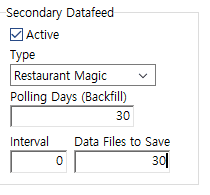
Step 2: Config Secondary Datafeed in Create
- Active
- Type = Restaurant Magic
- Backfill = 30
- Days to Save = 30 (can extend higher if you wish)
- Interval = 0