Focus Softkey Setup
Published on December 8, 2025
Existing Sites
**Only required if the hardware key is failing or needs to be replaced - existing keys will continue to work without issue
1. Reach out to focussupport@focuspos.com to request the key to be update to a soft/digital key
2. Do not proceed to the next step until instructed by support
3. To start off with uninstall the keylok driver
4. delete the J-File from status
5. reboot the key station
**This allows the softkey to be used instead of the hardware key, in the event there is an issue with the softkey you can install the hardware key drivers and it should pick up the key again.
6. Proceed to the New Site installation below
New Sites/Dongle uninstalled
1. Download and extract the attached Softkey Files into the root of the Focus folder on the key station (recommend placing in all stations)(4 files - 2 dlls, 2 applications)
2. SoftKey Files
Update Focus (Minimum Focus Version 10.1.250624)
3. On the station you want to be the virtual key station (recommend backup terminal)
A. Versions prior to 10.1.250910 - click the invalid license/bottom banner to display softkey form
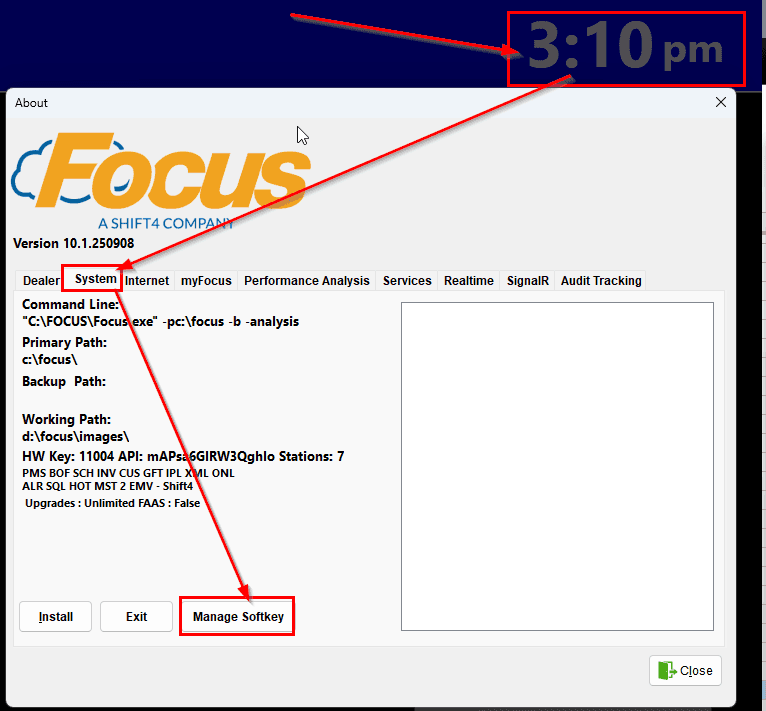
B. Version 10.11.250910+ the Softkey option is located under the Time > System > Manage Softkey or in Setup > Help > About > System > Manage Softkey
1. Activation Key input field to copy in the activation key, copy/paste and Activate
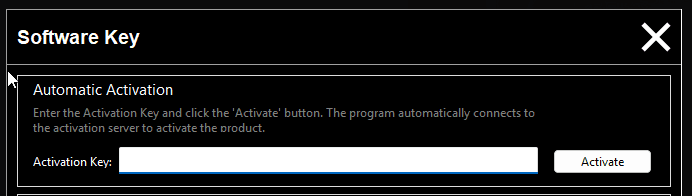
2. Activation Key is sent when the software is ordered or you can retrieve any time in Office under the Hardware Key management where previously you downloaded a .FOCUS folder
3. Should show as successful and pull in the software details from the cloud
Focus requires manual naming of the restaurant in misc>general with the use of Digital/Softkeys
- Login to Setup
- Misc>General
- Restaurant Tab
- Enter desired Restaurant Name in the 'Restaurant Name' Field

- Save & Close
- Restart Software